

Maraakate
Veteran Member
Some light rain today. Nothing too dangerous, but got it a bit dirty. That's why I never really bother too much with the cosmetics if it's a daily driver.


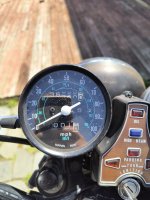
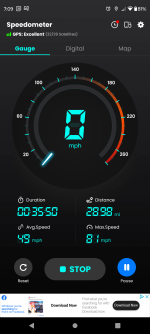
Frank,this ride is on the 400A ?70F today and now at close to 700 miles. Purposely took route 30 west out to the "light cycles" sitting in roadwork traffic then 462 east which is kind of like a "business route" which also involved sitting in traffic. Over 40 miles round trip and no issues at all. @esh21167 probably knows the area I'm talking about.
Averaging about 40-45MPG which is in spec.
If you're not out riding currently you should be!
Yes on the 400a.Frank,this ride is on the 400A ?
Friday afternoon and there's always traffic stalling the flow;I'm heading out for a ride anyway.
A trip to the store on county roads.
5 days, 250 miles. Go Frank!Yes on the 400a.
Yeah I don't play around. My car is basically in use from November to March, when it's raining or very windy, groceries or things that can't fit in the bike.5 days, 250 miles. Go Frank!
I pulled the Hawk carbs and want to have a ride with you for sure.

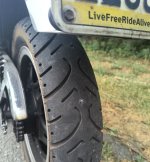
True. Sucks about the tire. Was hoping to really get some miles in before I leave.It pays, to pay attention to little changes on your bike. Your perception helped to head off a bad day, well done.
Always good to have, at least a small, back up can if you miss your planned gas stop. It's good to stop often, to check your tires too.True. Sucks about the tire. Was hoping to really get some miles in before I leave.
It's about 150 miles to Elmira, NY from here. I've done the ride perviously on the 550. 400 will be a bit more interesting as I'll have to fill up around 80-90 miles. Will be necessary to bring a 2 gallon can with me. With the CMs puny 2.5 gallon tank your option is to get the larger CM400E tank. I believe, but Jim would know for certain, that the larger CB400 tanks can work but also requires changing the seat. I'll make a thread on this ride sometime before I leave and will give status updates on fill ups and arrival.
 I actually have quite a few of these, the resistor plug variants including NGKs version because of the ignition coil kits I sell. Never know what someone might want.
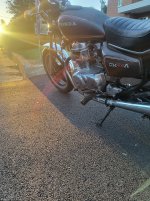
Wearing leather helps. I must admit I do need to get leather pants or chaps one of these days. It's the last thing I need to complete having all leather. If I had the chaps then I would have walked away totally clean, but having work pants on is better than shorts.Glad you're fine and a couple wrinkles on the bike will serve to remind you to keep your jackass proximity meter working good.

This is rebuilt so oil consumption will be different for you... but I did an oil change about 1000 miles ago and it just finally reached the low mark the other day. So it seems I'm about double the mileage compared to you. And I've pushed it pretty hard. Like revving it up to 60mph in 1 then shifting to 2 on the highway. WOT on highway pushing the limit around ~80mph for a good minute or two. So it definitely would have been vaporizing some of that oil from the stress.Glad you're OK. I was going to ask about your "Oil consumption is good" comment. on mine it takes about 300- 400 miles to go from the top full mark to the low mark. Just wondering where that fits in your experience.

Glad you're okay and the damage was minimal.A serious, but small, hiccup today. Some jackass hit me while I was crossing the street.

I like mileage goalsStill going. Have not ridden it much since late November. I did not make another thread about it, but CB550 is getting new Kibblewhite stainless steel valves as intake #4 was leaky anyways. Some knucklehead had the head off before and lots of pry marks on the head itself that it's basically trash. Got a better one from eBay sent to the machinist. Should have it back in about a month or so. Excited to just get it back to spec.
The goal was to get up to 40K miles on the 400A. I was about 600-700 miles shy of that goal.
A long while back a forum member posted pictures of the official CB400/CM400 carb adjustment tool. It took me a while, but I finally managed to find one at a reasonable price. Have not had a chance to put it to the test, but I am a sucker for official special tools if they can be found at reasonable prices.
Close is OK too.

Wow, that makes the Florida DMV look really smart...Took it out yesterday and started right up no issues. I got a renewal card in the mail and figured it's time to just get the antique plates.
It used to be you could get the plate the same day by going up to Harrisburg's main DMV and bringing your title, registration, old plate, proof of insurance. I was warned they required pictures now. Not an issue. Took pictures of the front, rear, and sides. I get up there then they complained I need a picture of the VIN now as well and asked me if someone was home that could just take a picture of it for me quick. Nobody was. So I'm mad, go home. Go back yesterday and brought a VIN pencil rubbing and a picture of the VIN from my phone and apparently they moved the goal posts again. Now it has to be an actual picture that you print out in colour of the VIN and she also complained that the front wheel was not aimed straight in the picture (?!). So, second trip to CVS for more pictures. I get there today and after much standing around while the trainee did her best I finally got this...
You mean, in "theory" you have a friend who may have done something like that. I also have a "friend" who would do something similar. Maybe. In theory.Meanwhile in TX I just title the bikes, register one and swap the plate around - even cars here don’t need an annual inspection anymore.
CA is weird, but not really overly difficult on anything pre-carb. They just run on engine number so if you’re transferring states it can get messy.
I mean. My eyesight isn’t great. Must’ve transposed a number or two.You mean, in "theory" you have a friend who may have done something like that. I also have a "friend" who would do something similar. Maybe. In theory.
Good price for a Hero 5, I might have to look into upgrading from my 2014 Hero 3Yes, i did some research its called WindSlayer. I ordered it. When it shows up I'll do another ride and see how it goes.
Video does look good. Not bad for $60. Next generation, gen 5, has built in GPS stuff you can add in as overlays in the video editor l. That'd be nice, but I don't need it that bad.
Still, with all the goodies it's a deal.I got a Hero 4. I still think it's pretty good. Came with accessories and extra batteries.
I had similar results with the wifi connection so I could watch on my phone while the GoPro was on my drone above. Worked okay when it wanted to work, sometimes it was just not cooperative.I will say the quik app to sync with phone is very obnoxious. Works when it feels like it. And this is coming from a professional programmer!
I've considered it myself. I let mine run one day while Chris and I were riding, stopping for gas, and a break stop when we talked to a couple of other riders on adventure bikes. It died about 20 minutes later during a part of the ride back to the cabin that I would have wanted recorded. Since then I tend to turn it off each stop. Still, when you consider the advancements in the last 20 years, it's amazing you can have a 1080p video camera running on a battery not much bigger than a sugar cube for an hour.In either case, the battery life is the worst thing about these "action cameras". There is nothing stopping you from getting a 3 or 6 foot long USB cable that runs to a power bank in your pocket or under the bike seat and have all day recording. I may do that if it ends up annoying me enough.
Initially I was paranoid about the helmet mount staying stuck to the helmet at speed. I was going to work on a safety strap just in case, had one I thought would work with a clip on the end, but it wasn't quite long enough to reach the D-rings on my helmet strap. Since then, after trusting it for a while, I've come to the conclusion it's up to the task, I've been 100 mph or damn close more than a few times and it's solid. I put mine on the left side of my helmet, never been a fan of putting one on the top. Looks goofy and the view is way higher.I got the helmet mount this morning and works as it should.
Or, you just sit for another minute or so with it idling on choke/fast idle and you can ride away without choke at all. But I'm retired and not in a hurry.To anyone who watches that and is new to these bikes... notice I how I started with choke closed/pulled up. I start it, let it idle like this for a few seconds and then I immediately move it down somewhere around 1/2 to 3/4. The idle then drops. You ride around, after some time has passed you progressively lower the choke until it is off. I see a lot of confusion about that from new riders who are not used to it.
